
OpenAI API Compatible Configuration
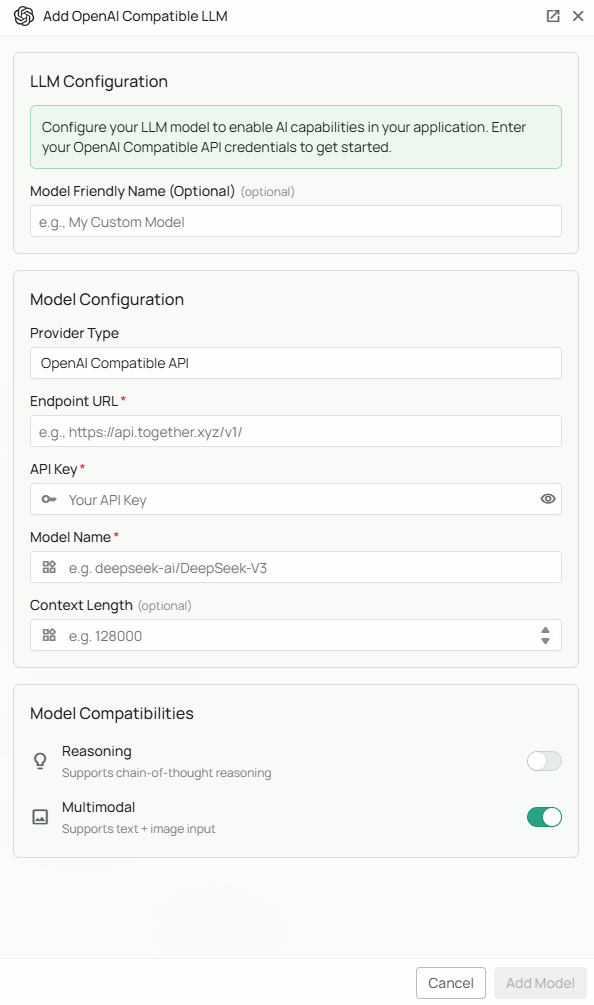
Required Fields
Endpoint URL *
The Endpoint URL is the base API endpoint for your OpenAI-compatible service. Common endpoint examples:- Together AI:
https://api.together.ai/v1 - OpenRouter:
https://openrouter.ai/api/v1/
/v1/, but this is not universal: DeepSeek currently documents https://api.deepseek.com without that suffix. Novaplan AI appends the paths needed for its requests. Confirm the value from the managed workspace before relying on the connection.
API Key *
The API Key is required to authenticate your requests to the OpenAI-compatible service. How to obtain an API Key:- Sign up or log in to your chosen provider’s platform
- Navigate to the API Keys or Settings section
- Create a new API key
- Copy the key immediately (most providers only show it once)
Model Name *
The Model Name field defines which specific model you want to use from your provider. Example model names by provider: Together AI examples:MiniMaxAI/MiniMax-M3openai/gpt-oss-120b
- Check your provider’s model catalog for available options
- Consider factors like context length, speed, and cost
- Verify the model name matches exactly as listed by the provider
- Test with smaller models first before scaling to larger ones
Optional Features
Multimodal
Enable this checkbox if your selected model supports multimodal input (text + images). When to enable:- Your model explicitly supports vision/image understanding
- You need to process documents with images or screenshots
- You want to analyze visual content alongside text
Reasoning
Enable this checkbox if your selected model has enhanced reasoning capabilities. When to enable:- Your selected model and provider explicitly support a reasoning mode
- You need advanced problem-solving capabilities
- Your use case involves mathematical or logical reasoning
Configuration Steps
As shown in the image above:- Select “OpenAI API Compatible” as your Provider Type from the dropdown
- Enter the Endpoint URL for your chosen provider (marked with *)
- Enter your API Key in the designated field (marked with *)
- Specify the exact Model Name as listed by your provider (marked with *)
- (Optional) Check “Multimodal” if your model supports image input
- (Optional) Check “Reasoning” if your model has enhanced reasoning capabilities
- Click “Add Model” to complete the setup
Supported Providers
The configuration can work with providers that implement the chat endpoints and parameters Novaplan AI uses. Check the provider’s documentation and test the connection before relying on it. Examples to evaluate include:- Together AI - Access to various open-source models with fast inference
- Groq - Ultra-fast inference with open-source models
- Perplexity - Online and offline models with search capabilities
- Anyscale - Enterprise-grade model serving
- OpenRouter - Unified interface to multiple LLM providers
- Fireworks AI - Fast inference for open-source models
- Deepinfra - Cost-effective access to open-source models
- Local providers - Self-hosted solutions like vLLM, Ollama with OpenAI compatibility
Usage Considerations
- API usage will count against your provider’s account quota and billing
- Different providers and models have different pricing structures
- Response times vary by provider and model size
- Ensure your endpoint supports the OpenAI API format (chat completions, embeddings, etc.)
- Some providers may have rate limits - check your plan details
- Context window sizes vary by model - verify limits for your use case
Troubleshooting
Connection Issues:- Verify the endpoint URL matches the provider’s documented base path; do not add
/v1/unless that provider requires it - Ensure your endpoint URL uses
https://for secure connections - Check that the endpoint is accessible from the managed Novaplan AI environment
- Verify your API key is correct and has not expired
- Ensure your API key has the necessary permissions for chat completions
- Check that your provider account has billing set up (if required)
- Confirm the model name exactly matches your provider’s naming convention
- Verify that your account has access to the specified model
- Check if the model requires special access or waitlist approval
- Ensure the selected model is currently available (not deprecated)
- Verify that multimodal/reasoning flags match the model’s actual capabilities
- Check your provider’s status page for any ongoing issues