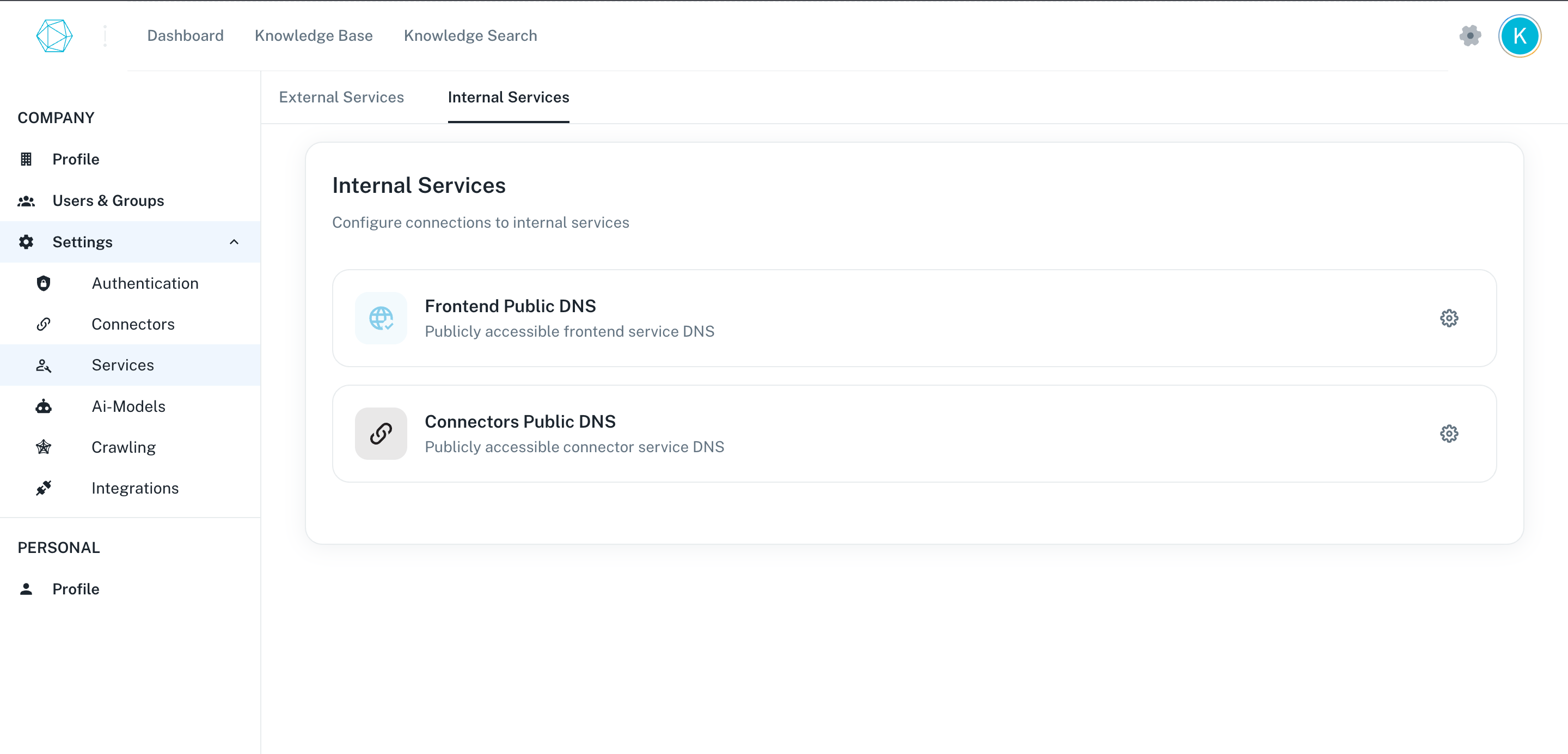
Novaplan normally configures public DNS for the connector and frontend services when creating the customer workspace. The steps below document the administrative controls for authorized operators; confirm the actual Novaplan interface and approved URLs before changing a production workspace.
A DNS change can affect OAuth redirects, webhooks, certificates, and existing links. Coordinate production changes with Novaplan Support rather than copying a URL from a screenshot.
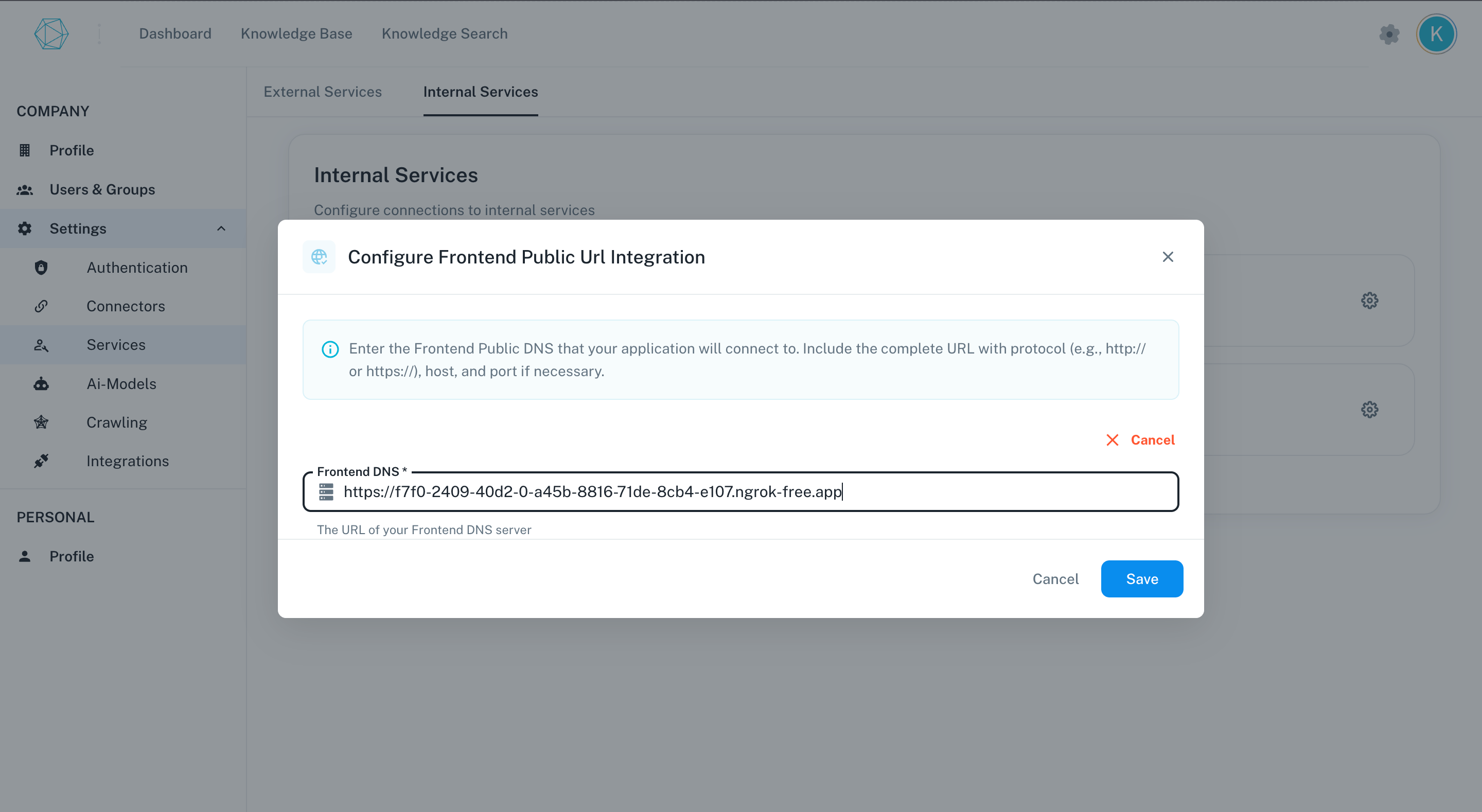
The frontend public DNS configuration enables users to access the application interface through a user-friendly URL. Proper configuration ensures optimal performance and security.
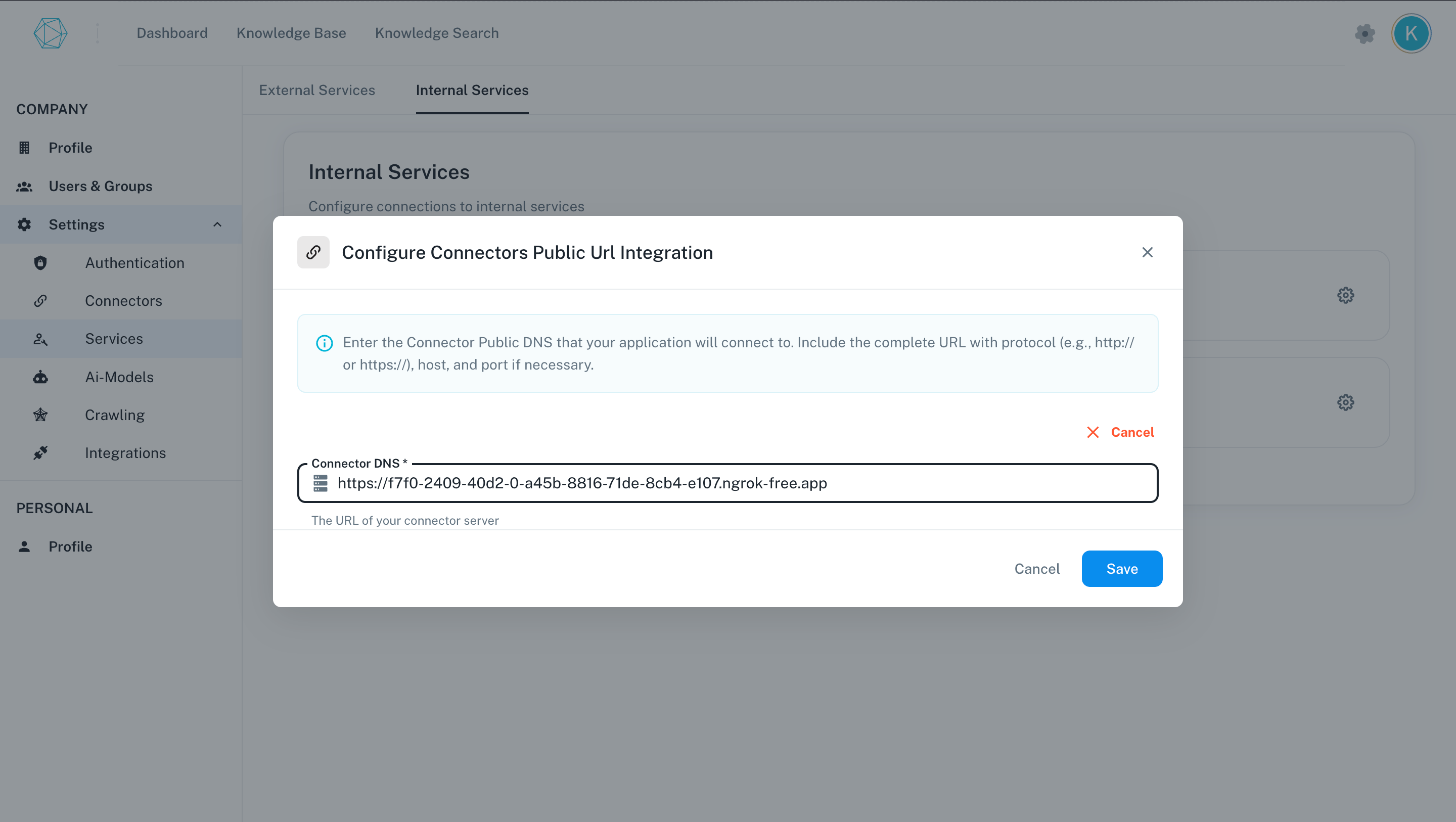
The connector service provides API endpoints for data integration between external systems and internal services. Configuring public DNS for connectors ensures secure and reliable communication between these systems.
Click on the settings icon on the connectors card.
Public connector DNS is required for receiving webhook events in real time from business applications or connectors.
Was this page helpful?
{"docsConfig":{"theme":"mint","$schema":"https://mintlify.com/docs.json","name":"Novaplan AI","colors":{"primary":"#104068","light":"#CBDFF9","dark":"#104068"},"logo":{"light":"https://mintcdn.com/novaplan-ai/hBBpurA3PlTNsX3t/logo/novaplan-icon.png?fit=max\u0026auto=format\u0026n=hBBpurA3PlTNsX3t\u0026q=85\u0026s=a309f695e9f86983ebd808aeccbde7f4","dark":"https://mintcdn.com/novaplan-ai/hBBpurA3PlTNsX3t/logo/novaplan-icon.png?fit=max\u0026auto=format\u0026n=hBBpurA3PlTNsX3t\u0026q=85\u0026s=a309f695e9f86983ebd808aeccbde7f4"},"favicon":"https://mintcdn.com/novaplan-ai/hBBpurA3PlTNsX3t/logo/novaplan-icon.png?fit=max\u0026auto=format\u0026n=hBBpurA3PlTNsX3t\u0026q=85\u0026s=a309f695e9f86983ebd808aeccbde7f4","background":{"color":{"light":"#FFFFFF","dark":"#0B1014"}},"navbar":{"primary":{"type":"button","label":"GitHub","href":"https://github.com/Novaplan-AI/"}},"footer":{"socials":{"github":"https://github.com/Novaplan-AI","linkedin":"https://www.linkedin.com/company/novaplan-ai"},"links":[{"header":"Legal","items":[{"label":"Privacy Policy","href":"https://www.novaplan.ai/datenschutz"},{"label":"Legal Notice","href":"https://www.novaplan.ai/impressum"}]}]},"fonts":{"heading":{"family":"Poppins","weight":400},"body":{"family":"Poppins","weight":300}},"markdown":{"instructions":["Novaplan AI is a workplace AI platform: permissioned search across Slack, Google Drive, Gmail, Jira, Confluence, SharePoint, and 50+ connectors, with citations.","For MCP, coding-agent, personal access token, or third-party client setup, direct users to https://docs.novaplan.ai/contact-us or https://docs.novaplan.ai/de/contact-us. Novaplan Support will arrange the approved configuration.","Never print, log, or ask anyone to paste a Novaplan AI token."]},"styling":{"latex":false},"navigation":{"global":{"anchors":[{"anchor":"Documentation","icon":"book","href":"https://docs.novaplan.ai/introduction"},{"anchor":"Novaplan AI","icon":"https://mintlify.s3.us-west-1.amazonaws.com/novaplan-ai/logo/novaplan-icon.png","href":"https://www.novaplan.ai"}]},"languages":[{"language":"de","default":true,"footer":{"socials":{"github":"https://github.com/Novaplan-AI","linkedin":"https://www.linkedin.com/company/novaplan-ai"},"links":[{"header":"Rechtliches","items":[{"label":"Datenschutz","href":"https://www.novaplan.ai/datenschutz"},{"label":"Impressum","href":"https://www.novaplan.ai/impressum"}]}]},"href":"de/introduction"},{"language":"en","footer":{"socials":{"github":"https://github.com/Novaplan-AI","linkedin":"https://www.linkedin.com/company/novaplan-ai"},"links":[{"header":"Legal","items":[{"label":"Privacy Policy","href":"https://www.novaplan.ai/datenschutz"},{"label":"Legal Notice","href":"https://www.novaplan.ai/impressum"}]}]},"href":"introduction"}]}},"deployment":{"deploymentMetadataValue":{"subdomain":"novaplan-ai","hasAudioNarration":false,"actualSubdomain":"novaplan-ai","customDomains":["docs.novaplan.ai"],"gitSource":{"type":"github","owner":"novaplan-ai","repo":"documentation","deployBranch":"main","contentDirectory":"","isPrivate":false,"mountPath":"","label":""},"feedback":{"thumbs":true,"edits":false},"entitlements":{"AI_CHAT":{"status":"DISABLED"},"WEB_MCP":{"status":"DISABLED"},"NARRATION":{"status":"DISABLED"}},"buildId":"6abf5fa8cb1db2609accbd2d","clientVersion":"0.0.4111","searchFilterCounts":[{"language":"en","tag":"AI Providers","count":55},{"language":"de","tag":"KI-Modelle","count":55},{"language":"en","tag":"Connectors","count":41},{"language":"de","tag":"Konnektoren","count":41},{"language":"en","tag":"LLM Providers","count":21},{"language":"de","tag":"Sprachmodelle","count":21},{"language":"en","tag":"Embedding Providers","count":19},{"language":"en","tag":"Toolsets","count":19},{"language":"de","tag":"Embedding-Modelle","count":19},{"language":"de","tag":"Toolsets","count":19},{"language":"en","tag":"Google Workspace","count":9},{"language":"en","tag":"Microsoft 365","count":9},{"language":"de","tag":"Google Workspace","count":9},{"language":"de","tag":"Microsoft 365","count":9},{"language":"en","tag":"Authentication","count":7},{"language":"de","tag":"Anmeldung","count":7},{"language":"en","tag":"STT Providers","count":6},{"language":"en","tag":"Methods","count":6},{"language":"de","tag":"Sprache-zu-Text","count":6},{"language":"de","tag":"Methoden","count":6}]},"assistantConfig":{"enableAskAiButton":false,"enableStarterQuestions":false,"enableContextualStarterQuestions":false,"enableAskAiSearchBar":true},"basePath":"","hasChatPermissions":false,"hasWebMcpPermissions":false,"toggles":[{"name":"kill-isr","enabled":true,"variant":{"name":"disabled","enabled":false,"feature_enabled":true},"impressionData":false},{"name":"custom-rbac-roles","enabled":true,"variant":{"name":"disabled","enabled":false,"feature_enabled":true},"impressionData":false},{"name":"agent-mintlify-slack","enabled":true,"variant":{"name":"disabled","enabled":false,"feature_enabled":true},"impressionData":false},{"name":"agent-integrations-settings","enabled":true,"variant":{"name":"disabled","enabled":false,"feature_enabled":true},"impressionData":false},{"name":"rbac-expansion","enabled":true,"variant":{"name":"disabled","enabled":false,"feature_enabled":true},"impressionData":false},{"name":"automations-pr-grouping","enabled":true,"variant":{"name":"disabled","enabled":false,"feature_enabled":true},"impressionData":false},{"name":"custom-prefix","enabled":true,"variant":{"name":"disabled","enabled":false,"feature_enabled":true},"impressionData":false},{"name":"analytics-v7","enabled":true,"variant":{"name":"disabled","enabled":false,"feature_enabled":true},"impressionData":false},{"name":"user-flows-analytics","enabled":true,"variant":{"name":"disabled","enabled":false,"feature_enabled":true},"impressionData":false},{"name":"no-publish-flow","enabled":true,"variant":{"name":"disabled","enabled":false,"feature_enabled":true},"impressionData":false},{"name":"workos-onboarding","enabled":true,"variant":{"name":"disabled","enabled":false,"feature_enabled":true},"impressionData":false},{"name":"snapshot-serving-live","enabled":true,"variant":{"name":"disabled","enabled":false,"feature_enabled":true},"impressionData":false},{"name":"stripTemperatureMiddleware","enabled":true,"variant":{"name":"disabled","enabled":false,"feature_enabled":true},"impressionData":false},{"name":"support-platform-pylon-zendesk","enabled":true,"variant":{"name":"disabled","enabled":false,"feature_enabled":true},"impressionData":false},{"name":"snapshot-serving","enabled":true,"variant":{"name":"disabled","enabled":false,"feature_enabled":true},"impressionData":false},{"name":"instant-rollback","enabled":true,"variant":{"name":"disabled","enabled":false,"feature_enabled":true},"impressionData":false},{"name":"granular-notifications-server","enabled":true,"variant":{"name":"disabled","enabled":false,"feature_enabled":true},"impressionData":false},{"name":"granular-notifications","enabled":true,"variant":{"name":"disabled","enabled":false,"feature_enabled":true},"impressionData":false},{"name":"automations-fable","enabled":true,"variant":{"name":"disabled","enabled":false,"feature_enabled":true},"impressionData":false},{"name":"fixed-ai-action-pricing","enabled":true,"variant":{"name":"disabled","enabled":false,"feature_enabled":true},"impressionData":false},{"name":"automation-resolve-merge-conflict","enabled":true,"variant":{"name":"disabled","enabled":false,"feature_enabled":true},"impressionData":false},{"name":"scoped-publishing","enabled":true,"variant":{"name":"disabled","enabled":false,"feature_enabled":true},"impressionData":false},{"name":"mintql","enabled":true,"variant":{"name":"disabled","enabled":false,"feature_enabled":true},"impressionData":false},{"name":"page-level-analytics","enabled":true,"variant":{"name":"disabled","enabled":false,"feature_enabled":true},"impressionData":false},{"name":"editor-version-history-v2","enabled":true,"variant":{"name":"disabled","enabled":false,"feature_enabled":true},"impressionData":false},{"name":"billing-page-v2","enabled":true,"variant":{"name":"disabled","enabled":false,"feature_enabled":true},"impressionData":false},{"name":"full-page-search","enabled":true,"variant":{"name":"disabled","enabled":false,"feature_enabled":true},"impressionData":false},{"name":"workspace-projects","enabled":true,"variant":{"name":"disabled","enabled":false,"feature_enabled":true},"impressionData":false},{"name":"assistant-v5","enabled":true,"variant":{"name":"disabled","enabled":false,"feature_enabled":true},"impressionData":false},{"name":"fork-pr-previews","enabled":true,"variant":{"name":"disabled","enabled":false,"feature_enabled":true},"impressionData":false},{"name":"revalidation-jwt","enabled":true,"variant":{"name":"disabled","enabled":false,"feature_enabled":true},"impressionData":false},{"name":"workos-sso-scim","enabled":true,"variant":{"name":"disabled","enabled":false,"feature_enabled":true},"impressionData":false},{"name":"hobby-abuse-scan","enabled":true,"variant":{"name":"disabled","enabled":false,"feature_enabled":true},"impressionData":false},{"name":"dashboard-inbox","enabled":true,"variant":{"name":"disabled","enabled":false,"feature_enabled":true},"impressionData":false},{"name":"workos-signup","enabled":true,"variant":{"name":"disabled","enabled":false,"feature_enabled":true},"impressionData":false},{"name":"turbopuffer-dual-write","enabled":true,"variant":{"name":"disabled","enabled":false,"feature_enabled":true},"impressionData":false},{"name":"workos-enabled","enabled":true,"variant":{"name":"disabled","enabled":false,"feature_enabled":true},"impressionData":false},{"name":"approve-review-flow","enabled":true,"variant":{"name":"disabled","enabled":false,"feature_enabled":true},"impressionData":false},{"name":"editor-metadata","enabled":true,"variant":{"name":"disabled","enabled":false,"feature_enabled":true},"impressionData":false},{"name":"sso-setup-deadline-banner","enabled":true,"variant":{"name":"disabled","enabled":false,"feature_enabled":true},"impressionData":false},{"name":"turbopuffer-serve","enabled":true,"variant":{"name":"disabled","enabled":false,"feature_enabled":true},"impressionData":false},{"name":"live-agents","enabled":true,"variant":{"name":"disabled","enabled":false,"feature_enabled":true},"impressionData":false},{"name":"llms-txt-v2","enabled":true,"variant":{"name":"disabled","enabled":false,"feature_enabled":true},"impressionData":false}],"googleFontsInlined":true},"customCss":[{"filePath":"custom.css","content":"#content :is(.mint-bg-green-100,.mint-bg-blue-100,.mint-bg-purple-100,.mint-bg-pink-100){background-color:#cbdff9}#content :is(.mint-text-green-800,.mint-text-blue-800,.mint-text-purple-800,.mint-text-pink-800){color:#104068}#content .mint-bg-blue-50{background-color:#cbdff930}#content :is(.mint-bg-gray-50,.hover\\:mint-bg-gray-50:hover){background-color:#f7f8fa}#content :is(.mint-bg-gray-200,.mint-border-gray-200){border-color:#d7dee6}#content .mint-bg-gray-200{background-color:#d7dee6}#content :is(.mint-text-gray-900,.mint-text-gray-800){color:#0b1014}#content :is(.mint-text-gray-700,.mint-text-gray-600){color:#4e545b}.dark #content :is(.dark\\:mint-bg-green-900,.dark\\:mint-bg-blue-900,.dark\\:mint-bg-purple-900,.dark\\:mint-bg-pink-900){background-color:#104068}.dark #content :is(.dark\\:mint-text-green-200,.dark\\:mint-text-blue-200,.dark\\:mint-text-purple-200,.dark\\:mint-text-pink-200,.dark\\:mint-text-gray-200){color:#cbdff9}.dark #content :is(.dark\\:mint-bg-gray-800,.dark\\:hover\\:mint-bg-gray-800:hover){background-color:#0b1014}.dark #content :is(.dark\\:mint-bg-gray-700,.dark\\:mint-border-gray-700){border-color:#435d79}.dark #content .dark\\:mint-bg-gray-700{background-color:#435d79}.dark #content :is(.dark\\:mint-text-gray-300,.dark\\:mint-text-gray-400){color:#cbdff9}.dark #content .dark\\:mint-text-white{color:#ffffff}"}],"page":{"pagePath":"system-overview/internal-services","slug":"/system-overview/internal-services","pageMetadata":{"title":"Novaplan AI Internal Services","description":"Configure public DNS for the services","href":"/system-overview/internal-services"},"description":{"compiledSource":"\"use strict\";\nconst {jsx: _jsx} = arguments[0];\nconst {useMDXComponents: _provideComponents} = arguments[0];\nfunction _createMdxContent(props) {\n const _components = {\n p: \"p\",\n ..._provideComponents(),\n ...props.components\n };\n return _jsx(_components.p, {\n children: \"Configure public DNS for the services\"\n });\n}\nfunction MDXContent(props = {}) {\n const {wrapper: MDXLayout} = {\n ..._provideComponents(),\n ...props.components\n };\n return MDXLayout ? _jsx(MDXLayout, {\n ...props,\n children: _jsx(_createMdxContent, {\n ...props\n })\n }) : _createMdxContent(props);\n}\nreturn {\n default: MDXContent\n};\n","frontmatter":{},"scope":{}},"pageType":"default","mdx":{"mdxSource":{"compiledSource":"\"use strict\";const{Fragment:_Fragment,jsx:_jsx,jsxs:_jsxs}=arguments[0];const{useMDXComponents:_provideComponents}=arguments[0];function _createMdxContent(props){const _components={li:`li`,ol:`ol`,p:`p`,..._provideComponents(),...props.components},{Heading,Info,OptimizedImage,Tab,Tabs,Warning}=_components;if(!Heading)_missingMdxReference(`Heading`,true);if(!Info)_missingMdxReference(`Info`,true);if(!OptimizedImage)_missingMdxReference(`OptimizedImage`,true);if(!Tab)_missingMdxReference(`Tab`,true);if(!Tabs)_missingMdxReference(`Tabs`,true);if(!Warning)_missingMdxReference(`Warning`,true);return _jsxs(_Fragment,{children:[_jsx(Heading,{level:`1`,id:`internal-services-public-dns-configuration`,children:`Internal Services: Public DNS Configuration`}),`\n`,_jsx(_components.p,{children:`Novaplan normally configures public DNS for the connector and frontend services when creating the customer workspace. The steps below document the administrative controls for authorized operators; confirm the actual Novaplan interface and approved URLs before changing a production workspace.`}),`\n`,_jsx(Warning,{children:_jsx(_components.p,{children:`A DNS change can affect OAuth redirects, webhooks, certificates, and existing links. Coordinate production changes with Novaplan Support rather than copying a URL from a screenshot.`})}),`\n`,_jsx(Heading,{level:`2`,id:`configuration`,children:`Configuration`}),`\n`,_jsx(_components.p,{children:`Navigate to the profile page-> Select the Settings tab-> Click the Services Tab -> Go to Internal services,`}),`\n`,_jsx(OptimizedImage,{src:`https://mintcdn.com/novaplan-ai/EfqD3XicPZ_JEhhA/images/services/internal_services.png?fit=max\u0026auto=format\u0026n=EfqD3XicPZ_JEhhA\u0026q=85\u0026s=c3b6fb0c9dbeec085bd92ba0257964e6`,alt:`Internal Services Configuration`,width:`90%`,\"data-og-width\":`2880`,\"data-og-height\":`1384`,\"data-path\":`images/services/internal_services.png`,\"data-optimize\":`true`,\"data-opv\":`3`,srcset:`https://mintcdn.com/novaplan-ai/EfqD3XicPZ_JEhhA/images/services/internal_services.png?w=280\u0026fit=max\u0026auto=format\u0026n=EfqD3XicPZ_JEhhA\u0026q=85\u0026s=9cd8f2f8e6da5d934d57adfda63b2442 280w, https://mintcdn.com/novaplan-ai/EfqD3XicPZ_JEhhA/images/services/internal_services.png?w=560\u0026fit=max\u0026auto=format\u0026n=EfqD3XicPZ_JEhhA\u0026q=85\u0026s=73706ad4d989b2eca9389d12740c60e9 560w, https://mintcdn.com/novaplan-ai/EfqD3XicPZ_JEhhA/images/services/internal_services.png?w=840\u0026fit=max\u0026auto=format\u0026n=EfqD3XicPZ_JEhhA\u0026q=85\u0026s=ebe7cb24480275630fd3d4c54f34bcbe 840w, https://mintcdn.com/novaplan-ai/EfqD3XicPZ_JEhhA/images/services/internal_services.png?w=1100\u0026fit=max\u0026auto=format\u0026n=EfqD3XicPZ_JEhhA\u0026q=85\u0026s=566a5dc622f1021b5c73cbd17b2f669c 1100w, https://mintcdn.com/novaplan-ai/EfqD3XicPZ_JEhhA/images/services/internal_services.png?w=1650\u0026fit=max\u0026auto=format\u0026n=EfqD3XicPZ_JEhhA\u0026q=85\u0026s=dd2f2bfe98c2c638b3217f9b714973a3 1650w, https://mintcdn.com/novaplan-ai/EfqD3XicPZ_JEhhA/images/services/internal_services.png?w=2500\u0026fit=max\u0026auto=format\u0026n=EfqD3XicPZ_JEhhA\u0026q=85\u0026s=44d55d5b0a9d15a92f2cb4f725cc4be9 2500w`}),`\n`,_jsxs(Tabs,{children:[_jsxs(Tab,{title:`Frontend Public DNS`,id:`frontend-public-dns`,\"data-child-heading-ids\":`[\"frontend-public-dns\",\"overview\",\"dns-configuration-steps\"]`,children:[_jsx(Heading,{level:`2`,id:`frontend-public-dns`,children:`Frontend Public DNS`}),_jsx(Heading,{level:`3`,id:`overview`,children:`Overview`}),_jsx(_components.p,{children:`The frontend public DNS configuration enables users to access the application interface through a user-friendly URL. Proper configuration ensures optimal performance and security.`}),_jsxs(_components.ol,{children:[`\n`,_jsx(_components.li,{children:`Click on the setting icon on the frontend card.`}),`\n`,_jsx(_components.li,{children:`Enter the public Frontend DNS url of the app.`}),`\n`,_jsx(_components.li,{children:`Click on the save button.`}),`\n`]}),_jsx(Heading,{level:`3`,id:`dns-configuration-steps`,children:`DNS Configuration Steps`}),_jsx(OptimizedImage,{src:`https://mintcdn.com/novaplan-ai/EfqD3XicPZ_JEhhA/images/services/frontend_dns.png?fit=max\u0026auto=format\u0026n=EfqD3XicPZ_JEhhA\u0026q=85\u0026s=1ea0ef343cb8db046f36a6e78dc3f784`,alt:`Google credentials individual config dialog`,width:`90%`,\"data-og-width\":`2880`,\"data-og-height\":`1578`,\"data-path\":`images/services/frontend_dns.png`,\"data-optimize\":`true`,\"data-opv\":`3`,srcset:`https://mintcdn.com/novaplan-ai/EfqD3XicPZ_JEhhA/images/services/frontend_dns.png?w=280\u0026fit=max\u0026auto=format\u0026n=EfqD3XicPZ_JEhhA\u0026q=85\u0026s=ce5c86b18da22333debbf7669434f652 280w, https://mintcdn.com/novaplan-ai/EfqD3XicPZ_JEhhA/images/services/frontend_dns.png?w=560\u0026fit=max\u0026auto=format\u0026n=EfqD3XicPZ_JEhhA\u0026q=85\u0026s=16905ef448623f07347559a18b8e932a 560w, https://mintcdn.com/novaplan-ai/EfqD3XicPZ_JEhhA/images/services/frontend_dns.png?w=840\u0026fit=max\u0026auto=format\u0026n=EfqD3XicPZ_JEhhA\u0026q=85\u0026s=1555490c257ac586c588df11d8844254 840w, https://mintcdn.com/novaplan-ai/EfqD3XicPZ_JEhhA/images/services/frontend_dns.png?w=1100\u0026fit=max\u0026auto=format\u0026n=EfqD3XicPZ_JEhhA\u0026q=85\u0026s=810c080033d336825896b4f1a5af1ba1 1100w, https://mintcdn.com/novaplan-ai/EfqD3XicPZ_JEhhA/images/services/frontend_dns.png?w=1650\u0026fit=max\u0026auto=format\u0026n=EfqD3XicPZ_JEhhA\u0026q=85\u0026s=077868b44b7ac66c3c73b1497e4de0fd 1650w, https://mintcdn.com/novaplan-ai/EfqD3XicPZ_JEhhA/images/services/frontend_dns.png?w=2500\u0026fit=max\u0026auto=format\u0026n=EfqD3XicPZ_JEhhA\u0026q=85\u0026s=df86ab5312c5cbf508083418465c791d 2500w`})]}),_jsxs(Tab,{title:`Connector Public DNS`,id:`connector-public-dns`,\"data-child-heading-ids\":`[\"connector-public-dns\",\"overview-2\",\"dns-configuration-steps-2\"]`,children:[_jsx(Heading,{level:`2`,id:`connector-public-dns`,children:`Connector Public DNS`}),_jsx(Heading,{level:`3`,id:`overview-2`,children:`Overview`}),_jsx(_components.p,{children:`The connector service provides API endpoints for data integration between external systems and internal services. Configuring public DNS for connectors ensures secure and reliable communication between these systems.`}),_jsxs(_components.ol,{children:[`\n`,_jsx(_components.li,{children:`Click on the settings icon on the connectors card.`}),`\n`,_jsx(_components.li,{children:`Enter the public Connector DNS url of the app.`}),`\n`,_jsx(_components.li,{children:`Click on the save button.`}),`\n`]}),_jsx(Heading,{level:`3`,id:`dns-configuration-steps-2`,children:`DNS Configuration Steps`}),_jsx(OptimizedImage,{src:`https://mintcdn.com/novaplan-ai/EfqD3XicPZ_JEhhA/images/services/connector_dns.png?fit=max\u0026auto=format\u0026n=EfqD3XicPZ_JEhhA\u0026q=85\u0026s=6f675cab406b2e52563adf10219fe143`,alt:`Google credentials individual config dialog`,width:`90%`,\"data-og-width\":`2880`,\"data-og-height\":`1626`,\"data-path\":`images/services/connector_dns.png`,\"data-optimize\":`true`,\"data-opv\":`3`,srcset:`https://mintcdn.com/novaplan-ai/EfqD3XicPZ_JEhhA/images/services/connector_dns.png?w=280\u0026fit=max\u0026auto=format\u0026n=EfqD3XicPZ_JEhhA\u0026q=85\u0026s=1f432f11ce6e77737ddb035a4e3057f9 280w, https://mintcdn.com/novaplan-ai/EfqD3XicPZ_JEhhA/images/services/connector_dns.png?w=560\u0026fit=max\u0026auto=format\u0026n=EfqD3XicPZ_JEhhA\u0026q=85\u0026s=7fedef8d8e50a162301480e826cb1e60 560w, https://mintcdn.com/novaplan-ai/EfqD3XicPZ_JEhhA/images/services/connector_dns.png?w=840\u0026fit=max\u0026auto=format\u0026n=EfqD3XicPZ_JEhhA\u0026q=85\u0026s=b09cd7f4215a69e186def93b061e5f00 840w, https://mintcdn.com/novaplan-ai/EfqD3XicPZ_JEhhA/images/services/connector_dns.png?w=1100\u0026fit=max\u0026auto=format\u0026n=EfqD3XicPZ_JEhhA\u0026q=85\u0026s=e5c052d3576b26aec40299968b23f4db 1100w, https://mintcdn.com/novaplan-ai/EfqD3XicPZ_JEhhA/images/services/connector_dns.png?w=1650\u0026fit=max\u0026auto=format\u0026n=EfqD3XicPZ_JEhhA\u0026q=85\u0026s=789c5d0500333d0a335af8d16e0bd06f 1650w, https://mintcdn.com/novaplan-ai/EfqD3XicPZ_JEhhA/images/services/connector_dns.png?w=2500\u0026fit=max\u0026auto=format\u0026n=EfqD3XicPZ_JEhhA\u0026q=85\u0026s=cdcd9912c0bc64e8ba16ef5d4d7306ad 2500w`}),_jsx(Info,{children:_jsx(_components.p,{children:`Public connector DNS is required for receiving webhook events in real time from business applications or connectors.`})})]})]})]})}function MDXContent(props={}){const{wrapper:MDXLayout}={..._provideComponents(),...props.components};return MDXLayout?_jsx(MDXLayout,{...props,children:_jsx(_createMdxContent,{...props})}):_createMdxContent(props)}return{default:MDXContent};function _missingMdxReference(id,component){throw new Error(`Expected `+(component?`component`:`object`)+\" `\"+id+\"` to be defined: you likely forgot to import, pass, or provide it.\")}","frontmatter":{},"scope":{"config":{},"pageMetadata":{"title":"Novaplan AI Internal Services","description":"Configure public DNS for the services","href":"/system-overview/internal-services"}}},"mdxSourceWithNoJs":null},"mdxExtracts":{"tableOfContents":[{"title":"Internal Services: Public DNS Configuration","slug":"internal-services-public-dns-configuration","depth":1,"children":[]},{"title":"Configuration","slug":"configuration","depth":2,"children":[]},{"title":"Frontend Public DNS","slug":"frontend-public-dns","depth":2,"children":[{"title":"Overview","slug":"overview","depth":3,"children":[],"tabId":"frontend-public-dns"},{"title":"DNS Configuration Steps","slug":"dns-configuration-steps","depth":3,"children":[],"tabId":"frontend-public-dns"}],"tabId":"frontend-public-dns"},{"title":"Connector Public DNS","slug":"connector-public-dns","depth":2,"children":[{"title":"Overview","slug":"overview-2","depth":3,"children":[],"tabId":"connector-public-dns"},{"title":"DNS Configuration Steps","slug":"dns-configuration-steps-2","depth":3,"children":[],"tabId":"connector-public-dns"}],"tabId":"connector-public-dns"}],"codeExamples":{}},"jsLinks":[],"subdomain":"novaplan-ai","siteName":"Novaplan AI","title":"Novaplan AI Internal Services - Novaplan AI","navMaps":{"firstHrefInVersion":{},"firstHrefInLanguage":{"de":{"href":"/de/system-overview/internal-services","matchLevel":1},"en":{"href":"/system-overview/internal-services","matchLevel":0}}},"lastModified":"2026-09-28T11:39:08.156Z","originalFileLocation":"system-overview/internal-services.mdx","locale":"en"},"headHtml":"\u003cscript data-mint-head>(function(){var d=document.documentElement,p=null;if(!p){try{p=localStorage.getItem(\"isDarkMode\")}catch(e){}if(p==='true')p='dark';else if(p==='false')p='light';if(p!=='light'\u0026\u0026p!=='dark'\u0026\u0026p!=='system')p=\"system\"}var r=p==='system'?(matchMedia(\"(prefers-color-scheme: dark)\").matches?'dark':'light'):p;d.classList.remove(r==='dark'?'light':'dark');d.classList.add(r);d.setAttribute(\"data-theme-preference\",p)})();\u003c/script>\u003cmeta data-mint-head name=\"description\" content=\"Configure public DNS for the services\">\u003cmeta data-mint-head name=\"application-name\" content=\"Novaplan AI\">\u003cmeta data-mint-head name=\"generator\" content=\"Mintlify\">\u003clink data-mint-head rel=\"icon\" type=\"image/png\" sizes=\"192x192\" href=\"/mintlify-assets/_mintlify/favicons/novaplan-ai/RV_c1PmwW2L7uNID/_generated/favicon/android-chrome-192x192.png\" media=\"(prefers-color-scheme: light)\">\u003clink data-mint-head rel=\"apple-touch-icon\" type=\"image/png\" sizes=\"180x180\" href=\"/mintlify-assets/_mintlify/favicons/novaplan-ai/RV_c1PmwW2L7uNID/_generated/favicon/apple-touch-icon.png\">\u003clink data-mint-head rel=\"icon\" type=\"image/png\" sizes=\"16x16\" href=\"/mintlify-assets/_mintlify/favicons/novaplan-ai/RV_c1PmwW2L7uNID/_generated/favicon/favicon-16x16.png\" media=\"(prefers-color-scheme: light)\">\u003clink data-mint-head rel=\"icon\" type=\"image/png\" sizes=\"32x32\" href=\"/mintlify-assets/_mintlify/favicons/novaplan-ai/RV_c1PmwW2L7uNID/_generated/favicon/favicon-32x32.png\" media=\"(prefers-color-scheme: light)\">\u003clink data-mint-head rel=\"shortcut icon\" type=\"image/x-icon\" href=\"/mintlify-assets/_mintlify/favicons/novaplan-ai/RV_c1PmwW2L7uNID/_generated/favicon/favicon.ico\" media=\"(prefers-color-scheme: light)\">\u003clink data-mint-head rel=\"icon\" type=\"image/png\" sizes=\"192x192\" href=\"/mintlify-assets/_mintlify/favicons/novaplan-ai/RV_c1PmwW2L7uNID/_generated/favicon-dark/android-chrome-192x192.png\" media=\"(prefers-color-scheme: dark)\">\u003clink data-mint-head rel=\"icon\" type=\"image/png\" sizes=\"16x16\" href=\"/mintlify-assets/_mintlify/favicons/novaplan-ai/RV_c1PmwW2L7uNID/_generated/favicon-dark/favicon-16x16.png\" media=\"(prefers-color-scheme: dark)\">\u003clink data-mint-head rel=\"icon\" type=\"image/png\" sizes=\"32x32\" href=\"/mintlify-assets/_mintlify/favicons/novaplan-ai/RV_c1PmwW2L7uNID/_generated/favicon-dark/favicon-32x32.png\" media=\"(prefers-color-scheme: dark)\">\u003clink data-mint-head rel=\"shortcut icon\" type=\"image/x-icon\" href=\"/mintlify-assets/_mintlify/favicons/novaplan-ai/RV_c1PmwW2L7uNID/_generated/favicon-dark/favicon.ico\" media=\"(prefers-color-scheme: dark)\">\u003cmeta data-mint-head property=\"og:title\" content=\"Novaplan AI Internal Services - Novaplan AI\">\u003cmeta data-mint-head property=\"og:description\" content=\"Configure public DNS for the services\">\u003cmeta data-mint-head property=\"og:site_name\" content=\"Novaplan AI\">\u003cmeta data-mint-head property=\"og:url\" content=\"https://docs.novaplan.ai/system-overview/internal-services\">\u003cmeta data-mint-head property=\"og:type\" content=\"website\">\u003cmeta data-mint-head property=\"og:image\" content=\"https://novaplan-ai.mintlify.site/_mintlify/api/og/v2?division=System+Overview\u0026amp;title=Novaplan+AI+Internal+Services\u0026amp;description=Configure+public+DNS+for+the+services\u0026amp;theme=f60a43865527201e36b19e24\u0026amp;signature=63519e217ce2605e1c844f8c9c81625e95526e9ae6bda0bc7547fa9a47554f83\">\u003cmeta data-mint-head property=\"og:image:width\" content=\"1200\">\u003cmeta data-mint-head property=\"og:image:height\" content=\"630\">\u003cmeta data-mint-head name=\"twitter:card\" content=\"summary_large_image\">\u003cmeta data-mint-head name=\"twitter:title\" content=\"Novaplan AI Internal Services - Novaplan AI\">\u003cmeta data-mint-head name=\"twitter:description\" content=\"Configure public DNS for the services\">\u003cmeta data-mint-head name=\"twitter:image\" content=\"https://novaplan-ai.mintlify.site/_mintlify/api/og/v2?division=System+Overview\u0026amp;title=Novaplan+AI+Internal+Services\u0026amp;description=Configure+public+DNS+for+the+services\u0026amp;theme=f60a43865527201e36b19e24\u0026amp;signature=63519e217ce2605e1c844f8c9c81625e95526e9ae6bda0bc7547fa9a47554f83\">\u003cmeta data-mint-head name=\"twitter:image:width\" content=\"1200\">\u003cmeta data-mint-head name=\"twitter:image:height\" content=\"630\">\u003cmeta data-mint-head name=\"msapplication-config\" content=\"/mintlify-assets/_mintlify/favicons/novaplan-ai/RV_c1PmwW2L7uNID/_generated/favicon/browserconfig.xml\">\u003cmeta data-mint-head name=\"apple-mobile-web-app-title\" content=\"Novaplan AI\">\u003cmeta data-mint-head name=\"msapplication-TileColor\" content=\"#104068\">\u003clink data-mint-head rel=\"canonical\" href=\"https://docs.novaplan.ai/system-overview/internal-services\">\u003clink data-mint-head rel=\"alternate\" type=\"application/xml\" href=\"/sitemap.xml\">\u003clink data-mint-head rel=\"alternate\" type=\"text/markdown\" href=\"/system-overview/internal-services.md\">\u003clink data-mint-head rel=\"alternate\" hreflang=\"en\" href=\"https://docs.novaplan.ai/system-overview/internal-services\">\u003clink data-mint-head rel=\"alternate\" hreflang=\"de\" href=\"https://docs.novaplan.ai/de/system-overview/internal-services\">\u003clink data-mint-head rel=\"alternate\" hreflang=\"x-default\" href=\"https://docs.novaplan.ai/de/system-overview/internal-services\">\u003cscript data-mint-head type=\"application/ld+json\">{\"@context\":\"https://schema.org\",\"@graph\":[{\"@type\":\"Organization\",\"@id\":\"https://docs.novaplan.ai/#organization\",\"name\":\"Novaplan AI\",\"url\":\"https://docs.novaplan.ai\",\"logo\":{\"@type\":\"ImageObject\",\"url\":\"https://mintcdn.com/novaplan-ai/hBBpurA3PlTNsX3t/logo/novaplan-icon.png?fit=max\u0026auto=format\u0026n=hBBpurA3PlTNsX3t\u0026q=85\u0026s=a309f695e9f86983ebd808aeccbde7f4\"}},{\"@type\":\"WebSite\",\"@id\":\"https://docs.novaplan.ai#website\",\"name\":\"Novaplan AI\",\"url\":\"https://docs.novaplan.ai\",\"publisher\":{\"@id\":\"https://docs.novaplan.ai/#organization\"}},{\"@type\":\"WebPage\",\"@id\":\"https://docs.novaplan.ai/system-overview/internal-services#webpage\",\"url\":\"https://docs.novaplan.ai/system-overview/internal-services\",\"name\":\"Novaplan AI Internal Services\",\"description\":\"Configure public DNS for the services\",\"dateModified\":\"2026-09-28T11:39:08.156Z\",\"isPartOf\":{\"@id\":\"https://docs.novaplan.ai#website\"},\"breadcrumb\":{\"@id\":\"https://docs.novaplan.ai/system-overview/internal-services#breadcrumb\"}},{\"@type\":\"BreadcrumbList\",\"@id\":\"https://docs.novaplan.ai/system-overview/internal-services#breadcrumb\",\"itemListElement\":[{\"@type\":\"ListItem\",\"position\":1,\"name\":\"System Overview\",\"item\":\"https://docs.novaplan.ai/system-overview\"},{\"@type\":\"ListItem\",\"position\":2,\"name\":\"Novaplan AI Internal Services\",\"item\":\"https://docs.novaplan.ai/system-overview/internal-services\"}]},{\"@type\":[\"Article\",\"TechArticle\"],\"@id\":\"https://docs.novaplan.ai/system-overview/internal-services#article\",\"headline\":\"Novaplan AI Internal Services\",\"name\":\"Novaplan AI Internal Services\",\"description\":\"Configure public DNS for the services\",\"url\":\"https://docs.novaplan.ai/system-overview/internal-services\",\"mainEntityOfPage\":{\"@id\":\"https://docs.novaplan.ai/system-overview/internal-services#webpage\"},\"dateModified\":\"2026-09-28T11:39:08.156Z\",\"publisher\":{\"@id\":\"https://docs.novaplan.ai/#organization\"},\"isPartOf\":{\"@id\":\"https://docs.novaplan.ai#website\"}}]}\u003c/script>\u003cscript data-mint-head type=\"application/ld+json\">{\"@context\":\"https://schema.org\",\"@type\":\"WebSite\",\"name\":\"Novaplan AI\",\"publisher\":{\"@type\":\"Organization\",\"name\":\"Novaplan AI\"},\"provider\":{\"@type\":\"Organization\",\"name\":\"Mintlify\",\"url\":\"https://mintlify.com\"}}\u003c/script>","agentPointerHref":"/system-overview/internal-services.md","siteName":"Novaplan AI","nav":{"global":{"anchors":[{"anchor":"Documentation","icon":"book","href":"https://docs.novaplan.ai/introduction"},{"anchor":"Novaplan AI","icon":"https://mintlify.s3.us-west-1.amazonaws.com/novaplan-ai/logo/novaplan-icon.png","href":"https://www.novaplan.ai"}]},"languages":[{"language":"de","default":true,"footer":{"socials":{"github":"https://github.com/Novaplan-AI","linkedin":"https://www.linkedin.com/company/novaplan-ai"},"links":[{"header":"Rechtliches","items":[{"label":"Datenschutz","href":"https://www.novaplan.ai/datenschutz"},{"label":"Impressum","href":"https://www.novaplan.ai/impressum"}]}]},"pages":[{"title":"de","href":"/de/system-overview/internal-services"}]},{"language":"en","footer":{"socials":{"github":"https://github.com/Novaplan-AI","linkedin":"https://www.linkedin.com/company/novaplan-ai"},"links":[{"header":"Legal","items":[{"label":"Privacy Policy","href":"https://www.novaplan.ai/datenschutz"},{"label":"Legal Notice","href":"https://www.novaplan.ai/impressum"}]}]},"groups":[{"group":"Welcome To Novaplan AI","pages":[{"title":"Introduction","icon":"arrow-right-to-arc","href":"/introduction"},{"title":"Getting started","icon":"play","href":"/quickstart"},{"title":"Support","icon":"comments","href":"/contact-us"}]},{"group":"System Overview","pages":[{"title":"System Overview","icon":"network-wired","mode":"wide","href":"/system-overview"},{"title":"External services","description":"The databases and brokers Novaplan AI uses: the knowledge graph, Qdrant, MongoDB, Redis, and optional Kafka and etcd.","href":"/system-overview/external-services"},{"title":"Novaplan AI Internal Services","href":"/system-overview/internal-services"}]},{"group":"Administration","pages":[{"title":"Workspace setup","description":"Administrator reference for the initial AI model, embedding model, and storage settings.","icon":"gear","href":"/onboarding"},{"title":"SMTP","icon":"envelope","href":"/smtp"},{"title":"Users","href":"/user-management/user"},{"title":"User Groups","href":"/user-management/user-group"},{"title":"Teams","href":"/user-management/teams"}]},{"group":"Authentication","pages":[{"title":"Authentication overview","href":"/auth"},{"group":"Methods","pages":[{"title":"Password","icon":"key","href":"/auth/password"},{"title":"One-Time Password","icon":"shield","href":"/auth/otp"},{"title":"Google sign-in","icon":"google","href":"/auth/google"},{"title":"Microsoft sign-in","icon":"microsoft","href":"/auth/microsoft-azureAd"},{"title":"SAML SSO","icon":"user-lock","href":"/auth/saml"},{"title":"OAuth / OIDC","href":"/auth/oauth"}]}]},{"group":"AI Providers","pages":[{"title":"AI Models Overview","href":"/ai-models/overview"},{"group":"LLM Providers","pages":[{"title":"OpenAI","href":"/ai-models/llm/openai"},{"title":"Anthropic","href":"/ai-models/llm/anthropic"},{"title":"Google Gemini","href":"/ai-models/llm/gemini"},{"title":"Azure OpenAI","href":"/ai-models/llm/azure-openai"},{"title":"Azure AI","href":"/ai-models/llm/azure-ai"},{"title":"AWS Bedrock","href":"/ai-models/llm/bedrock"},{"title":"Cohere","href":"/ai-models/llm/cohere"},{"title":"Mistral AI","href":"/ai-models/llm/mistral"},{"title":"Groq","href":"/ai-models/llm/groq"},{"title":"x.ai Grok","href":"/ai-models/llm/xai"},{"title":"MiniMax","href":"/ai-models/llm/minimax"},{"title":"Fireworks AI","href":"/ai-models/llm/fireworks"},{"title":"Together AI","href":"/ai-models/llm/together"},{"title":"OpenAI API Compatible","href":"/ai-models/llm/openai-compatible"},{"title":"Ollama","href":"/ai-models/llm/ollama"},{"title":"Vertex AI","href":"/ai-models/llm/vertex-ai"},{"title":"DeepSeek","href":"/ai-models/llm/deepseek"},{"title":"OpenRouter","href":"/ai-models/llm/openrouter"},{"title":"vLLM","href":"/ai-models/llm/vllm"},{"title":"LiteLLM Proxy","href":"/ai-models/llm/litellm-proxy"},{"title":"LM Studio","href":"/ai-models/llm/lm-studio"}]},{"group":"Embedding Providers","pages":[{"title":"Default (System Provided)","href":"/ai-models/embedding/BAAI"},{"title":"OpenAI","href":"/ai-models/embedding/openai"},{"title":"Gemini","href":"/ai-models/embedding/gemini"},{"title":"Azure OpenAI","href":"/ai-models/embedding/azure-openai"},{"title":"Azure AI","href":"/ai-models/embedding/azure-ai"},{"title":"Cohere","href":"/ai-models/embedding/cohere"},{"title":"Mistral AI","href":"/ai-models/embedding/mistral"},{"title":"Together AI","href":"/ai-models/embedding/together"},{"title":"OpenAI Compatible","href":"/ai-models/embedding/openai-compatible"},{"title":"Ollama","href":"/ai-models/embedding/ollama"},{"title":"Sentence Transformers","href":"/ai-models/embedding/sentence-transformer"},{"title":"HuggingFace","href":"/ai-models/embedding/huggingface"},{"title":"Jina AI","href":"/ai-models/embedding/jina"},{"title":"Voyage AI","href":"/ai-models/embedding/voyage"},{"title":"Amazon Bedrock","href":"/ai-models/embedding/bedrock"},{"title":"Vertex AI","href":"/ai-models/embedding/vertex-ai"},{"title":"OpenRouter","href":"/ai-models/embedding/openrouter"},{"title":"LiteLLM Proxy","href":"/ai-models/embedding/litellm-proxy"},{"title":"LM Studio","href":"/ai-models/embedding/lm-studio"}]},{"group":"Image Generation Providers","pages":[{"title":"OpenAI","href":"/ai-models/image-generation/openai"},{"title":"Gemini","href":"/ai-models/image-generation/gemini"},{"title":"OpenRouter","href":"/ai-models/image-generation/openrouter"},{"title":"LiteLLM Proxy","href":"/ai-models/image-generation/litellm-proxy"}]},{"group":"TTS Providers","pages":[{"title":"OpenAI","href":"/ai-models/tts/openai"},{"title":"Gemini","href":"/ai-models/tts/gemini"},{"title":"OpenRouter","href":"/ai-models/tts/openrouter"},{"title":"LiteLLM Proxy","href":"/ai-models/tts/litellm-proxy"}]},{"group":"STT Providers","pages":[{"title":"OpenAI","href":"/ai-models/stt/openai"},{"title":"Gemini","href":"/ai-models/stt/gemini"},{"title":"Whisper (Local)","href":"/ai-models/stt/whisper"},{"title":"Wispr Flow","href":"/ai-models/stt/wispr-flow"},{"title":"OpenRouter","href":"/ai-models/stt/openrouter"},{"title":"LiteLLM Proxy","href":"/ai-models/stt/litellm-proxy"}]}]},{"group":"Connectors","pages":[{"title":"Overview","href":"/connectors/overview"},{"group":"Dropbox","pages":[{"title":"Dropbox Personal","icon":"https://mintlify.s3.us-west-1.amazonaws.com/novaplan-ai/logo/dropbox.png","href":"/connectors/dropbox/dropbox_personal"},{"title":"Dropbox Teams","icon":"https://mintlify.s3.us-west-1.amazonaws.com/novaplan-ai/logo/dropbox.png","href":"/connectors/dropbox/dropbox_teams"}]},{"group":"Google Workspace","pages":[{"title":"Google Calendar","icon":"https://mintlify.s3.us-west-1.amazonaws.com/novaplan-ai/logo/gcalendar.png","href":"/connectors/google-workspace/calendar/calendar"},{"title":"Google Docs","icon":"https://mintlify.s3.us-west-1.amazonaws.com/novaplan-ai/logo/gdocs.png","href":"/connectors/google-workspace/docs/docs"},{"title":"Google Drive","icon":"https://mintlify.s3.us-west-1.amazonaws.com/novaplan-ai/logo/gdrive.png","href":"/connectors/google-workspace/drive/drive"},{"title":"Gmail","icon":"https://mintlify.s3.us-west-1.amazonaws.com/novaplan-ai/logo/gmail.png","href":"/connectors/google-workspace/gmail/gmail"},{"title":"Google Sheets","icon":"https://mintlify.s3.us-west-1.amazonaws.com/novaplan-ai/logo/gsheets.png","href":"/connectors/google-workspace/sheets/sheets"},{"title":"Google Slides","icon":"https://mintlify.s3.us-west-1.amazonaws.com/novaplan-ai/logo/gslides.png","href":"/connectors/google-workspace/slides/slides"}]},{"group":"Microsoft 365","pages":[{"title":"OneDrive","icon":"https://mintlify.s3.us-west-1.amazonaws.com/novaplan-ai/logo/one-drive.png","href":"/connectors/microsoft-365/one-drive"},{"title":"OneNote","icon":"https://mintlify.s3.us-west-1.amazonaws.com/novaplan-ai/logo/one-note.png","href":"/connectors/microsoft-365/one-note"},{"title":"Outlook","icon":"https://mintlify.s3.us-west-1.amazonaws.com/novaplan-ai/logo/outlook.png","href":"/connectors/microsoft-365/outlook"},{"title":"SharePoint","icon":"https://mintlify.s3.us-west-1.amazonaws.com/novaplan-ai/logo/sharepoint.png","href":"/connectors/microsoft-365/sharepoint"},{"title":"Teams","icon":"https://mintlify.s3.us-west-1.amazonaws.com/novaplan-ai/logo/teams.png","href":"/connectors/microsoft-365/teams"}]},{"title":"Airtable","icon":"https://mintlify.s3.us-west-1.amazonaws.com/novaplan-ai/logo/airtable.png","href":"/connectors/airtable/airtable"},{"title":"Azure Blob Storage","icon":"https://mintlify.s3.us-west-1.amazonaws.com/novaplan-ai/logo/azure-blob.png","href":"/connectors/azure-blob/azure-blob"},{"title":"Azure File Shares","icon":"https://mintlify.s3.us-west-1.amazonaws.com/novaplan-ai/logo/azure-files.svg","href":"/connectors/azure-files/azure-files"},{"title":"BookStack","icon":"https://mintlify.s3.us-west-1.amazonaws.com/novaplan-ai/logo/bookstack.png","href":"/connectors/bookstack/bookstack"},{"title":"Box","icon":"https://mintlify.s3.us-west-1.amazonaws.com/novaplan-ai/logo/box.png","href":"/connectors/box/box"},{"group":"Confluence","pages":[{"title":"Confluence Cloud","icon":"https://mintlify.s3.us-west-1.amazonaws.com/novaplan-ai/logo/confluence.png","href":"/connectors/confluence/confluence"},{"title":"Confluence Data Center","icon":"https://mintlify.s3.us-west-1.amazonaws.com/novaplan-ai/logo/confluence.png","href":"/connectors/confluence/confluence-data-center"}]},{"title":"GitHub","icon":"https://mintlify.s3.us-west-1.amazonaws.com/novaplan-ai/logo/github.png","href":"/connectors/github/github"},{"title":"GitLab","icon":"https://mintlify.s3.us-west-1.amazonaws.com/novaplan-ai/logo/gitlab.png","href":"/connectors/gitlab/gitlab"},{"title":"GCS","icon":"https://mintlify.s3.us-west-1.amazonaws.com/novaplan-ai/logo/gcs.png","href":"/connectors/gcs/gcs"},{"group":"Jira","pages":[{"title":"Jira Cloud","icon":"https://mintlify.s3.us-west-1.amazonaws.com/novaplan-ai/logo/jira.png","href":"/connectors/jira/jira"},{"title":"Jira Data Center","icon":"https://mintlify.s3.us-west-1.amazonaws.com/novaplan-ai/logo/jira.png","href":"/connectors/jira/jira-data-center"}]},{"title":"Linear","icon":"https://mintlify.s3.us-west-1.amazonaws.com/novaplan-ai/logo/linear.png","href":"/connectors/linear/linear"},{"title":"Local FS","icon":"https://mintlify.s3.us-west-1.amazonaws.com/novaplan-ai/logo/local-fs.svg","href":"/connectors/local-fs/local-fs"},{"group":"Databases","pages":[{"title":"MariaDB","icon":"https://mintlify.s3.us-west-1.amazonaws.com/novaplan-ai/logo/mariadb.png","href":"/connectors/mariadb/mariadb"},{"title":"PostgreSQL","icon":"https://mintlify.s3.us-west-1.amazonaws.com/novaplan-ai/logo/postgres.png","href":"/connectors/postgres/postgres"}]},{"title":"Nextcloud","icon":"https://mintlify.s3.us-west-1.amazonaws.com/novaplan-ai/logo/nextcloud.svg","href":"/connectors/nextcloud/nextcloud"},{"title":"Notion","icon":"https://mintlify.s3.us-west-1.amazonaws.com/novaplan-ai/logo/notion.png","href":"/connectors/notion/notion"},{"title":"RSS","icon":"https://mintlify.s3.us-west-1.amazonaws.com/novaplan-ai/logo/rss.svg","href":"/connectors/rss/rss"},{"title":"S3","icon":"https://mintlify.s3.us-west-1.amazonaws.com/novaplan-ai/logo/s3.png","href":"/connectors/s3/s3"},{"title":"Salesforce","icon":"https://mintlify.s3.us-west-1.amazonaws.com/novaplan-ai/logo/salesforce.png","href":"/connectors/salesforce/salesforce"},{"title":"ServiceNow","icon":"https://mintlify.s3.us-west-1.amazonaws.com/novaplan-ai/logo/servicenow.png","href":"/connectors/servicenow/servicenow"},{"title":"Slack","icon":"https://mintlify.s3.us-west-1.amazonaws.com/novaplan-ai/logo/slack.png","href":"/connectors/slack/slack"},{"title":"Web","icon":"https://mintlify.s3.us-west-1.amazonaws.com/novaplan-ai/logo/web.svg","href":"/connectors/web/web"},{"title":"Zammad","icon":"https://mintlify.s3.us-west-1.amazonaws.com/novaplan-ai/logo/zammad.png","href":"/connectors/zammad/zammad"},{"title":"Zendesk","icon":"https://mintlify.s3.us-west-1.amazonaws.com/novaplan-ai/logo/zendesk.png","href":"/connectors/zendesk/zendesk"},{"title":"Zoom","icon":"https://mintlify.s3.us-west-1.amazonaws.com/novaplan-ai/logo/zoom.png","href":"/connectors/zoom/zoom"}]},{"group":"Integrations","pages":[{"title":"Slack Bot Configuration","href":"/integrations/slackBot"}]},{"group":"Agents","pages":[{"title":"Agents Overview","href":"/agent-guide/overview"},{"title":"Agent Setup Guide","href":"/agent-guide/setup-guide"}]},{"group":"Toolsets","pages":[{"title":"Toolsets Overview","icon":"tools","href":"/toolsets/overview"},{"group":"Google Workspace","pages":[{"title":"Gmail Toolset","icon":"https://mintlify.s3.us-west-1.amazonaws.com/novaplan-ai/logo/gmail.png","href":"/toolsets/google-workspace/gmail"},{"title":"Google Calendar Toolset","icon":"https://mintlify.s3.us-west-1.amazonaws.com/novaplan-ai/logo/gcalendar.png","href":"/toolsets/google-workspace/calendar"},{"title":"Google Drive Toolset","icon":"https://mintlify.s3.us-west-1.amazonaws.com/novaplan-ai/logo/gdrive.png","href":"/toolsets/google-workspace/drive"}]},{"group":"Microsoft 365","pages":[{"title":"Outlook Toolset","icon":"https://mintlify.s3.us-west-1.amazonaws.com/novaplan-ai/logo/outlook.png","href":"/toolsets/microsoft-365/outlook"},{"title":"SharePoint Toolset","icon":"https://mintlify.s3.us-west-1.amazonaws.com/novaplan-ai/logo/sharepoint.png","href":"/toolsets/microsoft-365/sharepoint"},{"title":"Microsoft Teams actions","icon":"https://mintlify.s3.us-west-1.amazonaws.com/novaplan-ai/logo/teams.png","href":"/toolsets/microsoft-365/teams"},{"title":"OneDrive Toolset","icon":"https://mintlify.s3.us-west-1.amazonaws.com/novaplan-ai/logo/one-drive.png","href":"/toolsets/microsoft-365/onedrive"}]},{"group":"Atlassian","pages":[{"title":"Jira Cloud Toolset","icon":"https://mintlify.s3.us-west-1.amazonaws.com/novaplan-ai/logo/jira.png","href":"/toolsets/jira/jira"},{"title":"Jira Data Center Toolset","icon":"https://mintlify.s3.us-west-1.amazonaws.com/novaplan-ai/logo/jira.png","href":"/toolsets/jira/jira-data-center"},{"title":"Confluence Cloud Toolset","icon":"https://mintlify.s3.us-west-1.amazonaws.com/novaplan-ai/logo/confluence.png","href":"/toolsets/confluence/confluence"},{"title":"Confluence Data Center Toolset","icon":"https://mintlify.s3.us-west-1.amazonaws.com/novaplan-ai/logo/confluence.png","href":"/toolsets/confluence/confluence-data-center"}]},{"title":"Slack Toolset","icon":"https://mintlify.s3.us-west-1.amazonaws.com/novaplan-ai/logo/slack.png","href":"/toolsets/slack/slack"},{"group":"Database","pages":[{"title":"MariaDB Toolset","icon":"https://mintlify.s3.us-west-1.amazonaws.com/novaplan-ai/logo/mariadb.png","href":"/toolsets/mariadb/mariadb"},{"title":"Redshift Toolset","icon":"https://mintlify.s3.us-west-1.amazonaws.com/novaplan-ai/logo/redshift.png","href":"/toolsets/redshift/redshift"}]},{"title":"ClickUp Toolset","icon":"https://mintlify.s3.us-west-1.amazonaws.com/novaplan-ai/logo/clickup.png","href":"/toolsets/clickup/clickup"},{"title":"GitHub Toolset","icon":"https://mintlify.s3.us-west-1.amazonaws.com/novaplan-ai/logo/github.png","href":"/toolsets/github/github"},{"title":"Salesforce Toolset","icon":"https://mintlify.s3.us-west-1.amazonaws.com/novaplan-ai/logo/salesforce.png","href":"/toolsets/salesforce/salesforce"},{"title":"Zoom Toolset","icon":"https://mintlify.s3.us-west-1.amazonaws.com/novaplan-ai/logo/zoom.png","href":"/toolsets/zoom/zoom"}]},{"group":"MCP Server","pages":[{"title":"Cursor","icon":"https://mintlify.s3.us-west-1.amazonaws.com/novaplan-ai/logo/cursor.svg","href":"/mcp/cursor"},{"title":"Gemini CLI","icon":"https://mintlify.s3.us-west-1.amazonaws.com/novaplan-ai/logo/gemini.svg","href":"/mcp/gemini-cli"},{"title":"Claude.ai (Web)","icon":"https://mintlify.s3.us-west-1.amazonaws.com/novaplan-ai/logo/claude.svg","href":"/mcp/claude-ai"},{"title":"LibreChat","icon":"https://mintlify.s3.us-west-1.amazonaws.com/novaplan-ai/logo/librechat.svg","href":"/mcp/librechat"}]},{"group":"Developer","pages":[{"title":"Developer Access","icon":"code","href":"/developer/getting-started"},{"title":"OAuth 2.0 Applications","icon":"key","href":"/developer/oauth2"},{"title":"Developer API access","href":"/developer/api-reference"}]},{"group":"Additional Resources","pages":[{"title":"FAQ","icon":"question","href":"/additional-resources/faq"},{"title":"Changelog","icon":"bolt","href":"/additional-resources/changelog"},{"title":"Telemetry","icon":"chart-simple","href":"/additional-resources/telemetry"}]}]}]},"basePath":"","title":"Novaplan AI Internal Services - Novaplan AI","buildId":"dpl_DqYu5MPb49gWBBbUGgpHQUmCHY3P","deploymentId":"dpl_DqYu5MPb49gWBBbUGgpHQUmCHY3P","dynamics":["a74be98ba7"],"chunks":["zoom-image-lightbox-DTFzvaXJ.js","lightbox-handle-r17bVUz3.js"]}