
- A web app that people use in the browser for search, chat, and administration.
- An API that authenticates users, enforces permissions, and manages knowledge bases and files.
- Python services that sync data from your company apps, turn documents into searchable pieces, and return answers with citations.
Follow a question through the system
1
You ask in the browser, through an API, or through an agent
The browser, a REST or SDK client, or an MCP client sends your question to the Node.js API over HTTP. Chat and search can stream the reply over Server-Sent Events (SSE), which keeps a live connection open so the answer appears as it is written.
2
The API checks who is asking
The Node.js API verifies your session or token, applies your permissions, and forwards the question to the Query service.
3
Query finds sources and writes a cited answer
Query looks up related records in the knowledge graph and similar text in the configured vector store (Qdrant in the reference architecture), then calls the workspace’s language model. You get an answer with citations that point back to the original documents.
- Connectors pull data from Slack, Drive, Jira, Confluence, and your other sources.
- They publish new or changed records onto the event bus.
- Indexing parses the files, turns the text into vectors, and writes to the knowledge graph and configured vector store.
Architecture diagram
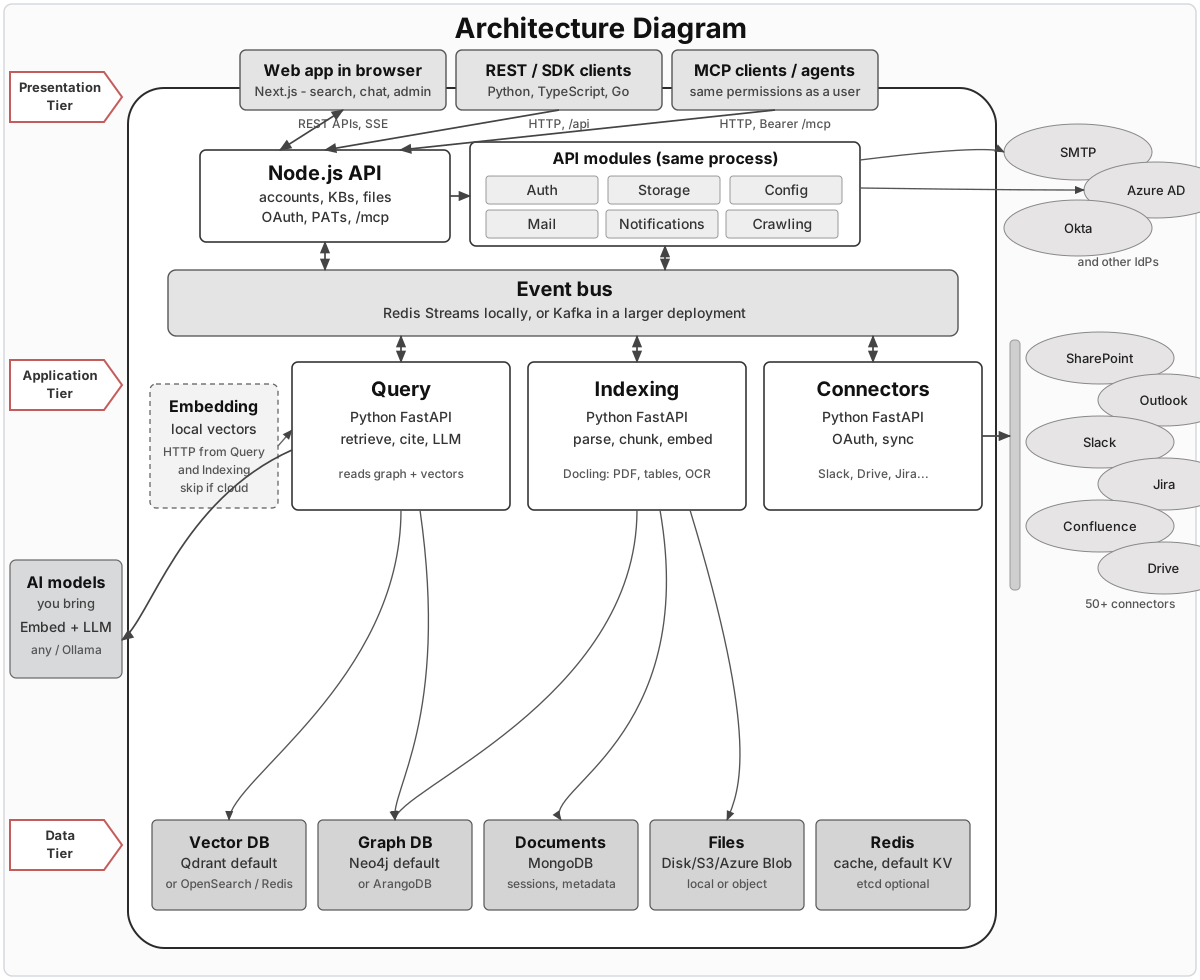
Click the figure to open it full size.
Who talks to Novaplan AI
Web app
People use Novaplan AI in the browser. The interface is a Next.js application for search, chat, and administration.REST and SDK clients
Your own applications can use approved HTTP interfaces. The developer API access guide explains how to choose an integration path. Contact Novaplan Support to confirm supported routes, SDK options, and permissions for your workspace.Agents and MCP
Agents can connect through the workspace’s MCP endpoint. Novaplan Support arranges the approved setup and user-scoped access for your workspace.Node.js API
The API is a Node.js process built with Express. The web app, REST and SDK clients, and MCP clients all talk to this process. It handles accounts, permissions, knowledge bases, file uploads, user authentication, personal access tokens, and MCP. Novaplan manages the runtime and exposes the web app, API, and MCP endpoint through the approved workspace address. Customers do not need local service ports to use these interfaces. For customer-facing tasks, see user management and connectors. For MCP and developer integrations, contact Novaplan Support. The detailed service API catalog is deferred until the deployed Enterprise contract is verified.How work is done
Modules in the API process
Auth, Storage, Mail, Config, Notifications, Crawling, and the connector manager run inside this Express process.Event bus
Connectors publish records onto the event bus, and Indexing consumes them. Novaplan selects the transport for the managed environment:- Redis Streams can carry connector events to indexing.
- Kafka is an alternative event bus for larger environments.
Query, Indexing, and Connectors
Query, Indexing, and Connectors are Python FastAPI services. Connectors talk to Slack, Drive, Jira, Confluence, and the rest of your company apps. They complete OAuth with those providers, refresh the tokens, and publish new or changed records onto the event bus. The connector manager in the API stores the encrypted configuration and forwards the browser OAuth redirects to this Python service. See the connectors overview for the full list. Indexing consumes those records from the event bus. It parses files, splits them into chunks, embeds the text, and writes to the vector store and knowledge graph. Docling is the heavier parser for PDFs, tables, and OCR. Separate Parsing and Extraction services may also be used, depending on the managed configuration. Query answers questions. It reads the knowledge graph and the vector store, then calls your language model. On the event bus it listens for configuration updates.Embedding server
Indexing and Query need vectors: lists of numbers that represent the meaning of a piece of text, so similar passages can be found later. The managed environment may use a dedicated embedding server over the OpenAI-compatible/v1/embeddings API or a configured cloud embedding provider. The box is dashed in the diagram because Query and Indexing call this service directly over HTTP when it is used.
Where data lives
Each box along the bottom of the diagram holds a different kind of state. The table shows the technologies described by the reference architecture; the actual Novaplan environment may use a different supported backend. Vendor notes and links are on external services.Models you bring
You point Novaplan AI at models you already use.- An embedding model turns parsed text into vectors for the configured vector store. The reference architecture can use a local embedding server; a managed workspace may use another provider.
- A language model (LLM) writes the cited answer. You can use any provider, or a local model through Ollama.