
OpenAI Configuration
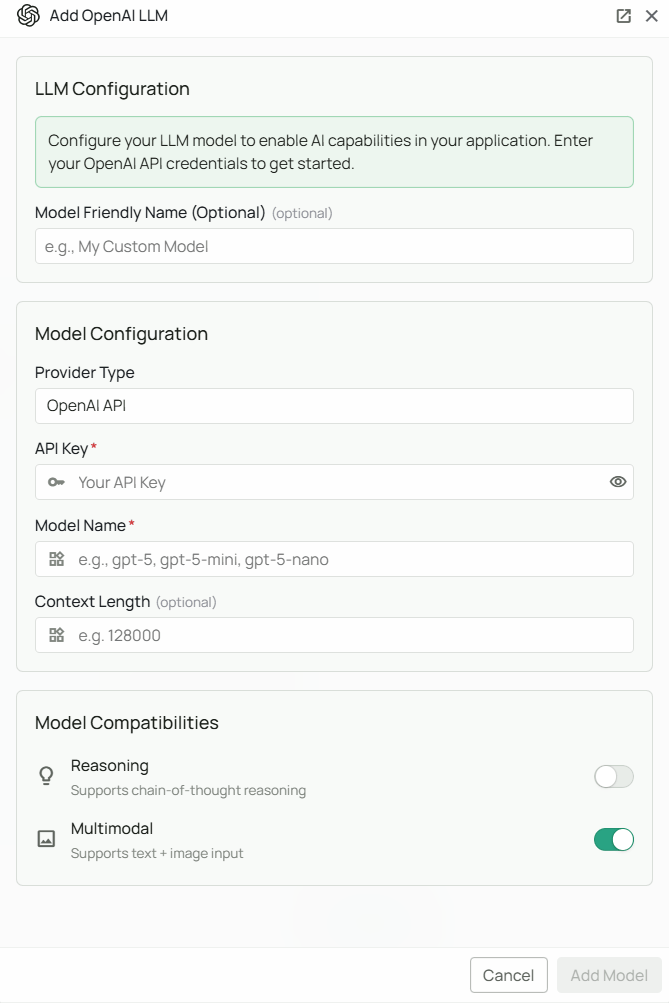
Required Fields
API Key
The OpenAI API Key is required to authenticate your requests to OpenAI’s services. How to obtain an API Key:- Log in to your OpenAI account
- Navigate to the API section
- Create a new secret key
- Copy the key immediately (it will only be shown once)
Model Name
The Model Name field defines which OpenAI model you want to use with Novaplan AI. Current model examples: OpenAI’s model catalog listsgpt-6-astra for demanding work, gpt-6-sol as a balance of capability and cost, and gpt-6-luna for high-volume tasks. These are examples, not a promise that every model or feature is already enabled in your Novaplan workspace.
How to choose a model:
- Copy the exact model ID available to your OpenAI project and review its capabilities, latency, and pricing
- Ask Novaplan to test the selected model with the deployed integration before assigning it to agents; tool calling and other features can depend on the API used
- Check OpenAI’s current model documentation whenever you change models
Configuration Steps
As shown in the image above:- Click Configure on the OpenAI provider card
- Enter your OpenAI API Key in the designated field (marked with *)
- Specify your desired Model Name (marked with *)
- Click Add Model to save and validate your credentials
Both the API Key and Model Name are required fields to successfully configure OpenAI integration.
Usage Considerations
- API usage will count against your OpenAI account’s quota and billing
- Different models have different pricing - check OpenAI’s pricing page for details
- Model capabilities vary - more powerful models may provide better results but at higher cost
Troubleshooting
- If you encounter authentication errors, verify your API key is correct and has not expired
- Ensure your OpenAI account has billing set up if you’re using paid models
- Check that the model name is spelled correctly and is available on your OpenAI account tier