
Anthropic Configuration
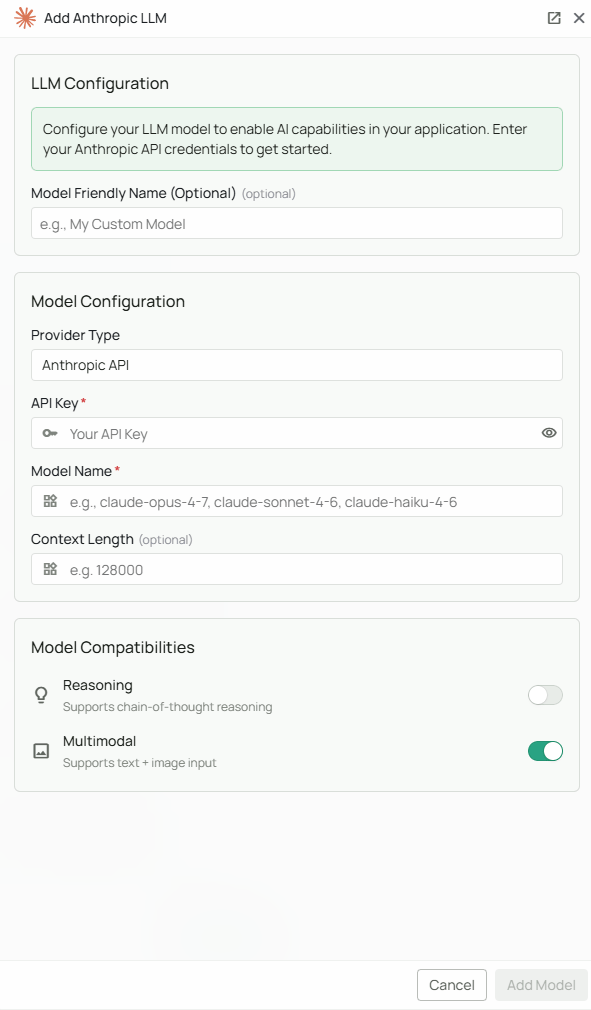
Required Fields
API Key *
The Anthropic API Key is required to authenticate your requests to Anthropic’s services. How to obtain an API Key:- Log in to your Anthropic Console
- Navigate to the “API Keys” section
- Create a new API key
- Copy the key immediately (it will only be shown once)
Model Name *
The Model Name field defines which Anthropic Claude model you want to use with Novaplan AI. Current Claude API examples include:claude-opus-5-5- A starting point for demanding knowledge workclaude-sonnet-5- A balance of speed and capabilityclaude-haiku-4-5- A lower-latency option
- Compare the available models in Anthropic’s current model overview and choose an ID enabled for your API key.
- Confirm the selected model and its features work with your Novaplan AI workspace before relying on it for production workflows. Anthropic may change model availability and pricing.
Configuration Steps
As shown in the image above:- Click Configure on the Anthropic provider card
- Enter your Anthropic API Key in the designated field (marked with *)
- Specify your desired Model Name (marked with *)
- Click Add Model to save and validate your credentials
Both the API Key and Model Name are required fields to successfully configure Anthropic integration. You must complete these fields to proceed with the setup.
Usage Considerations
- API usage will count against your Anthropic account’s quota and billing
- Different models have different pricing - check Anthropic’s current pricing for details
- Model capabilities vary - more powerful models may provide better results but at higher cost
- Claude models excel at:
- Nuanced content generation
- Detailed reasoning
- Following complex instructions
- Maintaining consistency in long conversations
Troubleshooting
- If you encounter authentication errors, verify your API key is correct and has not expired
- Ensure your Anthropic account has billing set up if you’re using paid models
- Check that the model name is spelled correctly and matches Anthropic’s naming conventions
- Verify that your account has access to the model you’ve selected