
OpenAI Image Generation Configuration
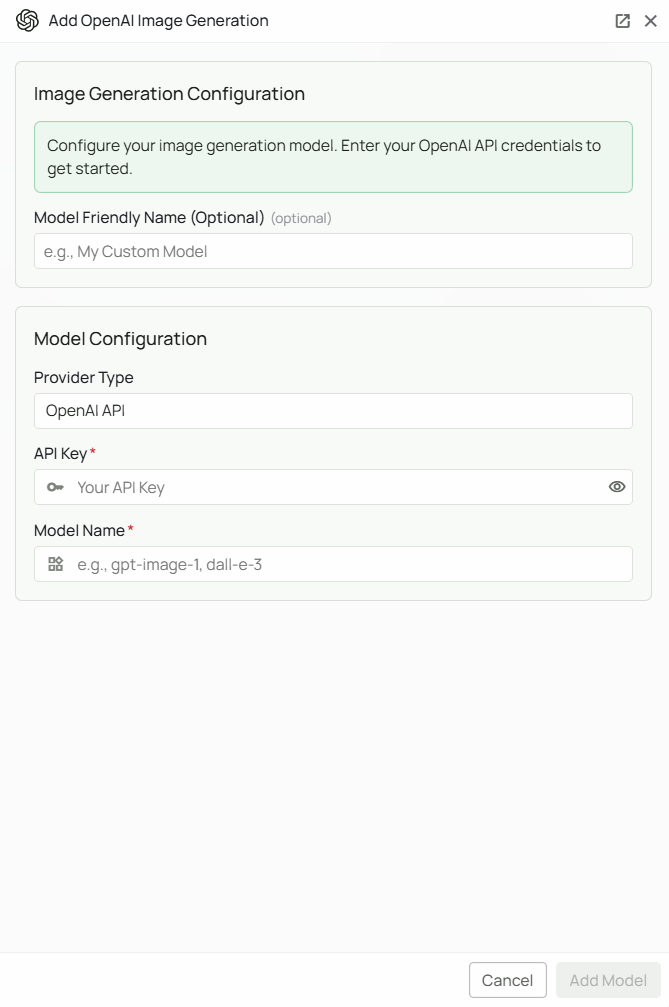
Required Fields
API Key *
The API Key is required to authenticate your requests to OpenAI’s image generation services. How to obtain an API Key:- Log in to your OpenAI account
- Navigate to the API Keys section
- Create a new secret key
- Copy the key immediately (it will only be shown once)
Model Name *
The Model Name field defines which OpenAI image generation model you want to use with Novaplan AI. Copy the exact model ID from OpenAI’s current image-generation guide, then confirm that the model works in your Novaplan AI workspace. Older setup screens may showgpt-image-1 or dall-e-3 as examples; a placeholder does not establish current availability. OpenAI marks DALL·E 3 as deprecated and removed from its API, so do not choose dall-e-3 for a new connection.
Configuration Steps
As shown in the image above:- Click Configure on the OpenAI provider card
- Enter your OpenAI API Key in the designated field (marked with *)
- Specify your desired Model Name (marked with *)
- (Optional) Set a Model Friendly Name — a human-readable label shown in the UI
- Click Add Model to save and validate your credentials
Both the API Key and Model Name are required fields to successfully configure OpenAI image generation integration.
Usage Considerations
- Each image generation request will count against your OpenAI account’s quota and billing
- Different models have different pricing — check OpenAI’s pricing page for details
- Image generation is typically more expensive per request than text generation
Troubleshooting
- If you encounter authentication errors, verify your API key is correct and has not expired
- Ensure your OpenAI account has billing set up
- Check that the model ID matches OpenAI’s current catalog exactly and is supported by the deployed workspace
- Verify your account has access to the image generation API (some API keys may have restrictions)