
Ollama Embeddings Configuration
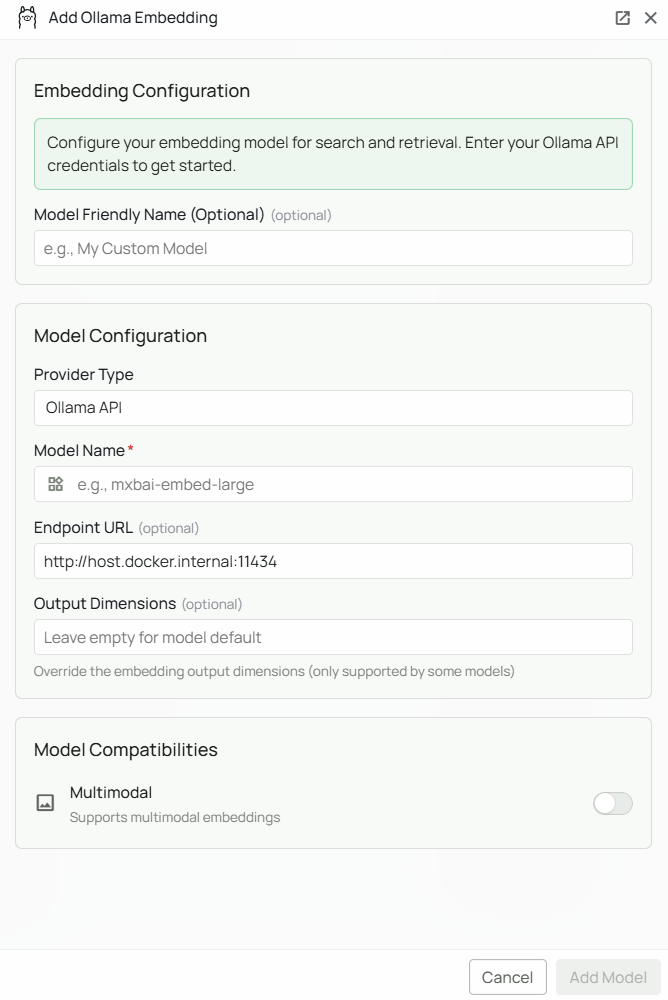
Required Fields
Model Name *
The Model Name field defines which Ollama embedding model you want to use with Novaplan AI. Popular Ollama embedding models include:mxbai-embed-large- A high-performance embedding model well-suited for retrieval tasks
- For general-purpose retrieval, select
mxbai-embed-large - Check Ollama’s model library for the full list of available embedding models
- Pull the model first with
ollama pull <model-name>before configuring it in Novaplan AI
Optional Fields
Endpoint URL
The URL where your Ollama instance is running. Defaults tohttp://host.docker.internal:11434 if left blank.
Common configurations:
http://host.docker.internal:11434— application default; use only if Novaplan confirms that the managed workspace can reach Ollama through this hostnamehttps://your-server-domain— for remote Ollama instances
localhost is not automatically reachable from a managed Novaplan AI workspace. Confirm the actual endpoint with Novaplan before configuring it.
API Key
Optional. Leave blank for standard local Ollama instances, which do not require authentication. When to use:- If you have configured authentication on your Ollama instance
- When connecting to a secured remote Ollama server
Configuration Steps
As shown in the image above:- Click Configure on the Ollama provider card
- Enter your Model Name (marked with *) — e.g.
mxbai-embed-large - (Optional) Specify your Endpoint URL — defaults to
http://host.docker.internal:11434 - (Optional) Enter an API Key if your Ollama instance requires authentication
- Click Add Model to save and validate your credentials
Model Name is the only required field. No API key is needed for a standard local Ollama installation. The endpoint defaults to http://host.docker.internal:11434 if left blank.
Prerequisites
Before configuring Ollama in Novaplan AI, ensure you have:- Ollama installed on your machine or server — download from ollama.com
- The embedding model pulled:
- Ollama running:
ollama serve - Network accessible: Novaplan must confirm the managed workspace can reach the Ollama endpoint
Usage Considerations
- Embedding requests are processed by the Ollama server your organization or Novaplan provides; confirm its location and access controls
- No API key or usage costs required
- Processing speed depends on your server’s available CPU/memory/GPU
Troubleshooting
- Verify Ollama is running:
ollama list - Check the endpoint URL matches where Ollama is accessible
- Ensure port 11434 is not blocked by a firewall
- Ask Novaplan to verify the managed workspace can reach the configured endpoint; the default
host.docker.internalmay not resolve there - If the model is not found, pull it first:
ollama pull <model-name>